
Cash advances
Cash advance to an employee: how to track what’s left at any moment
You hand over 20,000 DA on Monday, and by Friday nobody knows where the advance stands. A simple way to track it down to the last dinar, on paper or on a phone.
· 3 min read
Monday morning, Karim gives 20,000 DA to Yacine, his site foreman. There’s diesel to buy, screws to pick up, maybe a taxi. On Friday, Yacine hands back 3,000 DA and says: “The rest went on diesel and hardware.”
Karim believes him. Yacine is honest. But nobody really knows where the 17,000 DA went, and the next week it starts all over again.
The problem isn’t trust. It’s memory. Nobody remembers the details of five days of small purchases.
An advance is not an expense
This is the most common mistake, and it throws everything else off. On the day you give an employee 20,000 DA, you haven’t spent anything. The money has just moved to a different pocket. It still belongs to the business.
If you record “20,000 DA, advance to Yacine” as an expense, two things happen:
- your monthly expenses are inflated by money that may not have been spent yet;
- you lose track of what’s left in Yacine’s pocket, since the advance has “disappeared” from the books.
The right way to see it: an advance is a transfer. The real expenses are the diesel and the screws, at the moment Yacine pays for them.
The method in four steps
- Handing it over: you record that 20,000 DA moves from your register to the employee’s.
- The expenses: each purchase is deducted from the advance, with its reason. Not from the company total, from the advance.
- The balance: at any moment, advance minus expenses equals what the employee should have in their pocket.
- The check-in: on a set date (Friday, the end of the job), you compare that balance with the actual cash. They hand back what’s left, or you top it up.
On paper
One sheet per advance, which the employee keeps on them:
| Date | Reason | Amount | Left |
|---|---|---|---|
| Mon 03/11 | Advance from Karim | +20,000 | 20,000 |
| Mon 03/11 | Diesel for the van | −4,200 | 15,800 |
| Wed 05/11 | Screws and wall plugs | −2,600 | 13,200 |
| Thu 06/11 | Taxi, panel delivery | −1,500 | 11,700 |
It works, on one condition: the employee fills in the sheet on the spot. And the sheet doesn’t end up in the washing machine with the trousers.
In MyCaisse: a sub-register for the advance
At Atelier Benali, our demo account, the Hydra job site has its own register, and that register has a Fuel sub-register. Yacine is assigned to it. When Karim gives him an advance, he makes a transfer from the main register. Two taps, and the money shows up in the sub-register.
From then on, Yacine records every fill-up from his phone, with a photo of the receipt. The sub-register’s balance goes down with each expense. Karim can see exactly what’s left from his office, without calling anyone.
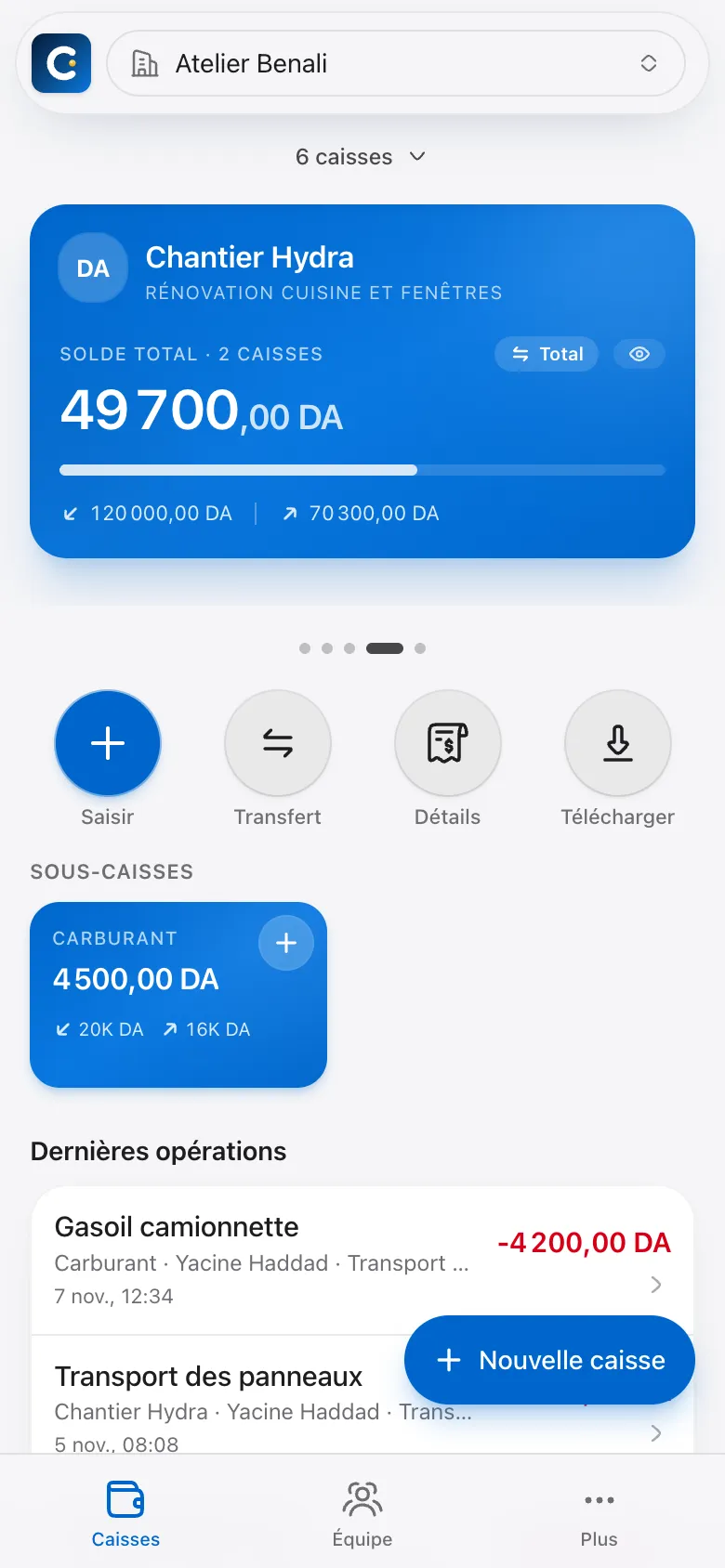
On Friday there’s nothing to argue about: the balance on screen is what Yacine should have on him. If he hands back what’s left, that’s a transfer in the other direction.
Questions we often get
“What if my employee doesn’t have a smartphone?” You can record entries for them. In the entry form, you pick the employee, and the expense is tied to their name and their register.
“I don’t want them to see the balance of the other registers.” They won’t. An employee only sees the registers you assign them to, and you decide whether they can see their colleagues’ entries.
“What if they make a big purchase without asking me?” You can set an amount above which their entries wait for your approval. We cover it in detail in our article on employee spending limits.
The takeaway
Track an advance like a small petty cash fund of its own: a starting amount, spending recorded on the spot, and a balance you check on a set date. Whether you do it on a sheet of paper or in an app, never count it as an expense on the day you hand it over.
To see Yacine’s sub-register for real, open the demo, then tap “Chantier Hydra” (the Hydra job site).